
Vet summary
One page for the visit, behind a link you can switch off.
Choose the date range and the sections, and CovePet turns the records into one page the vet can read in a minute, essentials first, then the records by day. Sharing that page, as a link or a PDF, is on CovePet Pro.
Coming Soon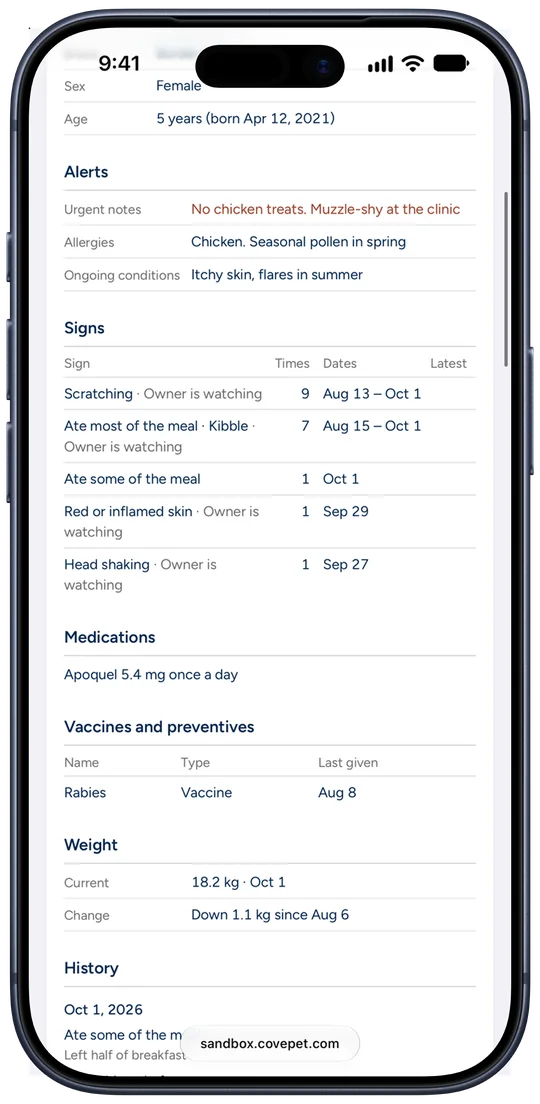
1.Essentials first
Allergies, medications, current weight, and what is being watched sit at the top. The vet reads those before the records.
2.You pick what goes in
Choose the kinds of records and the profile sections. The link shows those, plus the pet’s name and your name and phone.
3.A link you control
Every link can be switched off. Switch off one without affecting the others. Sharing a vet summary, as a link or a PDF, is on CovePet Pro.
The rest of the record
- One sentence is enoughType what you noticed. CovePet fills in the date and the details.
- TimelineOne line per record, in order, dated, with the time if you add one.
- Watch a problemSee when a problem started and how often it came back.
- Photos and videoA photo of the rash and a clip of the episode, on the record itself.
- Works with no signalA record saved with no signal waits on the phone.
- HouseholdEveryone who cares for the pet, writing into one record.